
Laboratory Sample Tracking System: Complete Lab Guide
Quick answer: A laboratory sample tracking system helps pathology labs, diagnostic centres and hospital laboratories identify a sample, see its current status and location, record important movements, and follow its journey from collection through testing and reporting.
If your team regularly asks “Where is this sample?” or “What happened to it?”, this guide explains what to look for in tracking software and how to test it with a real laboratory workflow.
A useful system should connect sample identification, collection, accessioning, processing, testing, transfer, storage and reporting instead of treating each step as a separate record.
The mistake is choosing software because it has a barcode feature or a nice dashboard. A proper evaluation starts with one real sample and follows it through your laboratory.
What does a laboratory sample tracking system actually track?
Short answer: It tracks the sample’s identity, status, location and important workflow events so authorised staff can understand where the sample is and what has happened to it.
At its simplest, the system creates a digital identity for a sample and records the important events in its journey.
That journey might look like this:
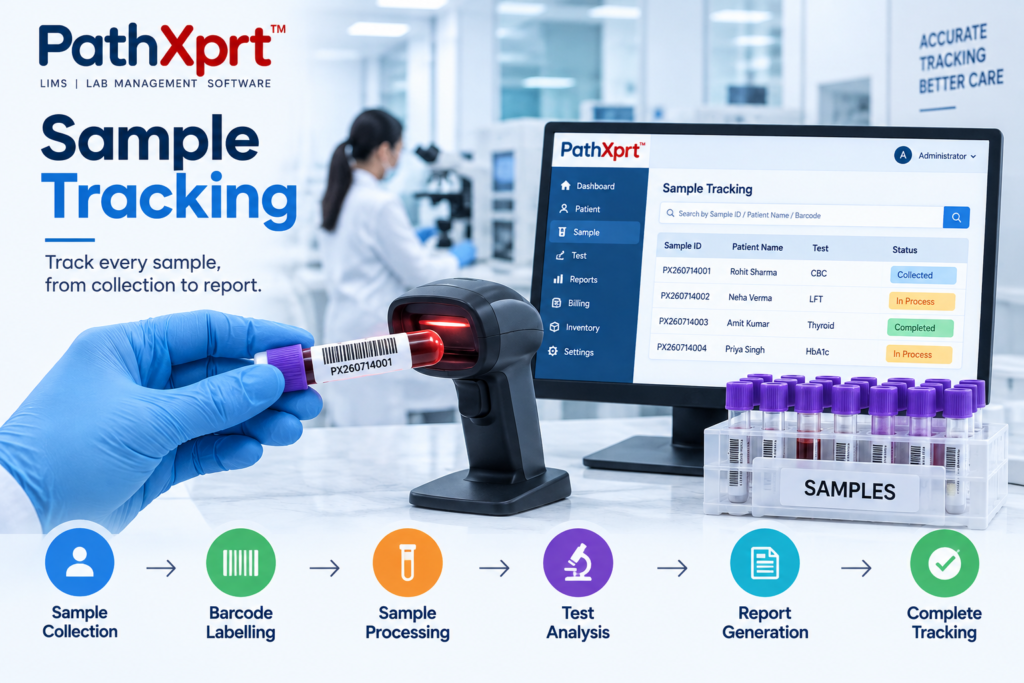
Patient registration → Sample collection → Accessioning → Identification → Processing → Testing → Verification → Reporting → Storage or archival
The exact workflow differs between a pathology lab, hospital laboratory, diagnostic centre and research facility.
The principle does not.
Every movement should leave a usable record.
A sample tracking platform such as LabKey Sample Manager describes tracking sample lineage, chain of custody, sample status and events throughout the laboratory lifecycle.
For a pathology laboratory, this information becomes much more useful when sample tracking is connected with the wider pathology laboratory management workflow.
Why is sample location only part of the problem?
Short answer: Knowing where a sample is stored is useful, but a tracking system should also show its current workflow stage, previous movements and next action.
Suppose a technician asks, “Where is sample 45821?”
Knowing that it is in the laboratory is not enough.
The useful answer is something closer to: the sample was received, assigned for testing, moved to a particular workflow stage, and is currently waiting for the next action.
That is the difference between a sample register and a tracking system.
Modern sample-management platforms describe tracking around status, movement, custody and history rather than simply recording that a sample exists. CrelioHealth, for example, describes tracking from registration through processing, storage, outsourcing and archival.
For laboratories using spreadsheets today, this is one of the first things worth testing during a software demonstration.
Ask the vendor to find one sample without telling them where it is.
Watch how long it takes.
Barcode tracking is useful, but the barcode is not the system
Short answer: A barcode identifies the sample quickly; the tracking software must then connect that scan to the correct record and update the relevant workflow event.
Barcodes make sample identification easier. They do not automatically create traceability.
The important question is what happens after the barcode is scanned.
A useful workflow should connect the identifier with the appropriate patient, specimen and test information and then record relevant status changes as the sample moves through the laboratory.
CrelioHealth’s laboratory sample management system describes unique barcode-based identification and tracking across laboratory processes.
So don’t ask a vendor only:
“Does your software support barcodes?”
Ask:
“Show me what happens after I scan this sample.”
That exposes the real workflow.
What should happen when a sample reaches the laboratory?
Short answer: The system should create or retrieve the correct sample record, capture the required information, assign the relevant tests and place the sample into the right workflow stage.
Accessioning is where the digital sample journey begins to become useful.
The system should allow staff to identify the specimen, record relevant information, assign the required tests and move it into the correct workflow.
For example, the laboratory may need to record:
- Sample identification
- Sample type
- Collection or receipt information
- Assigned tests
- Sample condition
- Current status
- Department or location
- Transfer or outsourcing information
The exact fields should match your laboratory’s SOPs rather than a generic software template.
For a pathology lab, I would also test the exception workflow.
What happens if the sample is insufficient? What happens if it is rejected? What happens if another test is added? What happens when the sample has to be transferred?
Practical example: During a demo, create a sample with two tests, mark the specimen as insufficient, then add the required follow-up action. Check whether the system keeps the original sample identity and records the exception without creating a duplicate sample.
Can the system follow a sample between departments and locations?
Short answer: It should record meaningful transfers so authorised users can see where the sample came from, where it went and what status it has after the move.
This becomes a bigger issue as laboratory operations grow.
A sample may start at a collection centre, move to a central laboratory, enter a testing department and later be stored or transferred elsewhere.
If the software only records the original location, it is not giving the laboratory a complete picture.
CrelioHealth describes sample movement across locations and outsourcing workflows, while pathology software platforms in India also commonly position barcode tracking as part of a connected laboratory workflow.
During a demo, test this exact scenario:
Collection Centre → Central Lab → Testing Department → Reporting → Archive
Ask the vendor to show the sample’s status after every transition.
If the answer requires opening several unrelated screens—or checking another spreadsheet—that is worth questioning.
Explore PathXprt’s laboratory management workflow if you are looking for a broader LIMS approach rather than an isolated tracking tool.
Why chain of custody matters in sample tracking
Short answer: Chain-of-custody records help show who handled or transferred a sample, when the event occurred and where the sample moved, where those records are required by the laboratory’s procedures.
Sample tracking is also about knowing what happened between two locations or workflow stages.
Who received it?
Who transferred it?
When did the transfer happen?
Where did it go?
LabKey describes sample tracking with chain-of-custody records and event history, while other laboratory systems describe custody transfers as part of sample traceability.
For laboratories working under specific quality or accreditation requirements, the exact record-keeping requirements should be checked against the applicable standard and the laboratory’s own procedures.
Do not treat a vendor’s “compliance ready” statement as proof of compliance by itself.
What happens when a sample is rejected, held or delayed?
Short answer: The system should make exceptions visible and preserve the sample history instead of forcing staff to track rejected, held or delayed specimens in a separate manual register.
This is where many software demonstrations become too comfortable.
The vendor shows the normal path:
Registered → Tested → Reported.
Real laboratories are messier.
A sample might need a quality check. Testing might be delayed. A specimen might need to be transferred or outsourced. A result might require review before reporting.
A sample tracking system should give the laboratory a clear way to record the relevant state and history instead of hiding the exception.
Some current laboratory systems explicitly include states such as hold, quarantine and release alongside custody and storage tracking.
That is why I recommend asking the vendor to demonstrate a failed or interrupted workflow—not just the successful one.
Where does sample storage fit into the tracking workflow?
Short answer: Tracking can continue after testing when your laboratory needs to store, retrieve, archive or dispose of samples according to its documented procedures.
Tracking does not necessarily stop when testing finishes.
Depending on the laboratory’s procedures, samples or related material may need to be stored, retrieved, archived or disposed of according to defined processes.
LabKey’s sample tracking documentation includes sample lineage, aliquots, storage and history, while CrelioHealth describes sample archival as part of its sample management workflow.
The practical test is simple:
Can an authorised user find an old sample record and understand its history without asking the person who originally handled it?
If not, the tracking system is not solving the entire problem.
Is a sample tracking system the same as a LIMS?
Short answer: Not necessarily. Sample tracking focuses on sample identity, status, movement and history, while a broader LIMS can connect those functions with testing, results, reporting, instruments and other laboratory workflows.
No. The terms overlap, but they are not automatically interchangeable.
A sample tracking system may concentrate on sample identity, movement, status, custody and storage. A broader LIMS may connect sample management with testing, result processing, reporting, instruments, quality workflows and other laboratory operations.
For example, LabKey’s sample tracking platform focuses heavily on sample lifecycle, lineage, custody and workflow management.
Other platforms position sample tracking as one module inside a larger laboratory information system. CrelioHealth describes sample management alongside reporting, instrument integration and broader laboratory operations.
For a pathology lab replacing its main software, I would compare the complete workflow instead of purchasing sample tracking as a disconnected application.
What should you check before buying a laboratory sample tracking system?
Short answer: Test the software against your own sample journey, including normal processing, transfers and exceptions. A live workflow test is more useful than comparing feature counts alone.
- Unique sample identification and barcode support
- Clear current status and location
- Movement and transfer history
- Chain-of-custody records where required
- Rejected, held and delayed sample handling
- Storage and historical retrieval
- Multi-location or collection-centre workflows
- Integration with LIMS, instruments and reporting where needed
Don’t compare vendors by feature count alone.
Use your own sample workflow as the test.
1. Sample identification
Can the system create or capture a unique sample identifier and connect it to the correct record?
2. Barcode scanning
Can staff scan samples at the points where your laboratory actually needs identification and movement tracking?
3. Sample status
Can users quickly see whether the sample is received, processing, waiting, transferred, outsourced, completed or archived?
4. Location history
Can you see where the sample has been and where it is now?
5. Chain of custody
Does the system retain relevant transfer and handling events?
6. Exception handling
Can the team record rejected, held, delayed or otherwise exceptional samples without creating a separate manual register?
7. Storage and retrieval
Can authorised staff locate historical sample records and related storage information?
8. Integration
Does the tracking workflow connect with your existing LIMS, instruments, reporting or other laboratory systems where required?
9. Multi-location workflow
If you operate collection centres or multiple branches, can the same sample remain traceable after it moves between locations?
Who should not buy a separate sample tracking system?
Not every laboratory needs another application.
If your existing LIS or LIMS already provides reliable sample identification, status tracking, location history and the other workflows your laboratory needs, adding a separate tracking product could create unnecessary duplication.
The same applies to a very small laboratory with a simple workflow where the current process is already controlled and traceable.
The purchase should start with a problem—not with a feature list.
Where does PathXprt fit?
PathXprt is positioned as a laboratory software platform rather than simply a barcode tracker.
For a pathology laboratory evaluating a new system, the useful question is therefore not just whether it tracks a sample. The question is whether sample tracking connects with the rest of the laboratory workflow.
PathXprt can be evaluated as part of that wider workflow, particularly if you are looking for laboratory management software rather than a standalone sample-location database.
LIMS software for small pathology labs
How should you evaluate the software before making a decision?
Key takeaway: The best test is a live end-to-end workflow using a sample scenario that reflects your laboratory. Include at least one exception so you can see how the software behaves when the normal process changes.
- Start with sample collection and registration.
- Scan or identify the specimen.
- Record accessioning and assigned tests.
- Move the sample through processing and testing.
- Transfer it between departments or locations.
- Put it on hold or mark it rejected and review the history.
- Complete reporting and check the final traceability record.
Use one real sample.
Start at collection.
Then demonstrate registration, barcode identification, accessioning, testing, transfer, reporting and storage.
After the normal workflow works, break it.
Reject the sample. Put it on hold. Transfer it. Outsource it. Search for it later.
Watch what the software does.
That demonstration will tell you much more about a laboratory sample tracking system than a presentation filled with feature icons.
If your current process makes staff ask “Where is this sample?” or “What happened to it?”, make those two questions the centre of your software evaluation.
Next step: map one complete sample journey from collection to final report, then ask each software vendor to reproduce that journey live inside their system.
Laboratory Sample Tracking System: FAQs
What is a laboratory sample tracking system?
It is software that records a sample’s identity, status, location and important workflow events so authorised staff can follow its journey through the laboratory.
Why is sample tracking important in a pathology lab?
It helps staff understand where a specimen is, what has happened to it and what action is expected next, particularly when samples move between departments or locations.
Is barcode scanning enough for sample tracking?
No. Barcode scanning identifies a sample, but the software also needs to connect the scan with the correct record and relevant workflow events.
Can a LIMS track rejected or delayed samples?
A suitable LIMS can support exception workflows when those statuses are part of the configured laboratory process. The exact workflow should be tested during a demo.
Should a small lab buy separate sample tracking software?
Not necessarily. If its existing LIMS already provides reliable identification, status, movement and history, a separate system may duplicate records. The decision should start with the actual workflow problem.