
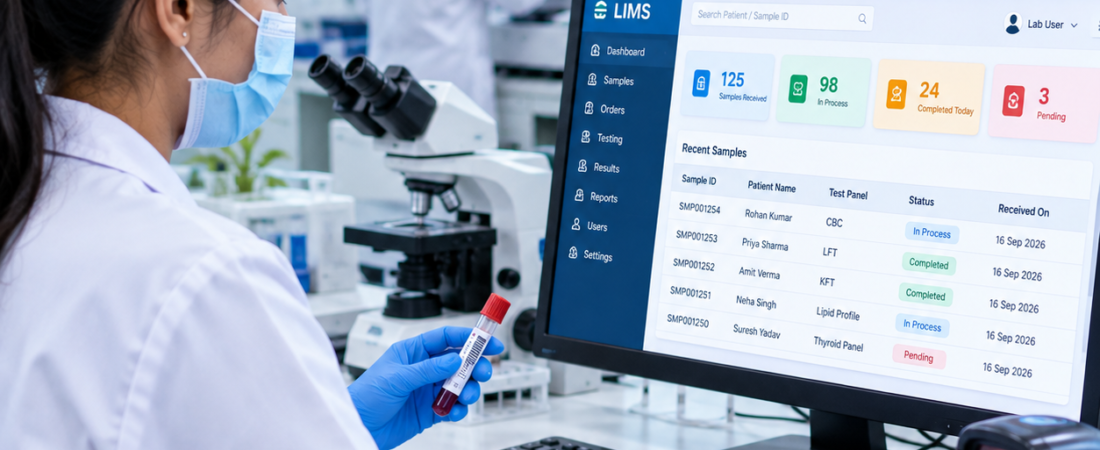
Best LIMS Software in Noida: A Practical Guide for Modern Laboratories
If you are searching for the best LIMS software in Noida, you probably do not need another long feature list. You need to know whether the software will actually make your laboratory’s daily work easier. A practical LIMS should connect patient registration, test orders, sample collection, tracking, result entry, verification, reporting and billing in one workflow.
Quick answer: The right LIMS for a Noida laboratory is the one that matches your real workflow, supports your staff and equipment, keeps patient and sample information connected, and can grow with your laboratory. For pathology labs, diagnostic centres, hospital laboratories and collection-centre networks, a live demo using real scenarios is more useful than comparing feature counts.
PathXprt is a cloud-based laboratory management platform designed for diagnostic laboratories, hospital labs, clinics and individual laboratories. This guide explains what to check before choosing LIMS software in Noida, which questions to ask vendors, and how to judge whether a system is a practical fit.
What Is LIMS Software?
Short answer: LIMS software is a digital system that helps a laboratory manage samples, test information, results and related workflows from registration through reporting.
LIMS stands for Laboratory Information Management System. In day-to-day use, it can connect patient details, test orders, sample identification, processing, result entry, report approval and delivery instead of keeping each step in a separate register or application. The CDC also describes a LIMS as software that supports laboratory operations, including the acquisition, analysis, storage and reporting of laboratory data. CDC: Introduction to LIMS and laboratory information systems.
For a pathology or diagnostic laboratory, a typical workflow may include:
- Patient registration and test booking
- Appointment and enquiry management
- Sample collection and barcode identification
- Sample accessioning, acceptance and rejection
- Sample tracking and test processing
- Result entry and verification
- Report generation, approval and delivery
- Billing, payments and discounts
- Inventory and operational reporting
The important point is not simply having these features. They should work together in a way that feels natural to the people using the system every day.
Why Do Laboratories in Noida Need LIMS Software?
Short answer: A LIMS becomes useful when manual registers, spreadsheets, repeated data entry or disconnected systems make it difficult to see what is happening to patients, samples and reports.
Imagine a normal morning in a busy diagnostic centre. The receptionist registers patients, a phlebotomist collects samples, the lab team receives and processes them, a pathologist checks results, and the front desk sends reports. If every person works from a different record, even a small correction can turn into a chain of phone calls and manual updates.
A connected LIMS gives the team one workflow to follow. A sample can stay linked to the patient and order while it moves through collection, processing, verification and reporting. That does not automatically remove every laboratory error, but it can make information easier to trace and can reduce unnecessary re-entry of the same details.
This can be particularly useful for laboratories in Noida, Greater Noida and Delhi NCR that operate collection centres, multiple branches or growing teams.
Key Features to Check in the Best LIMS Software in Noida
1. Patient Registration and Order Management
The first test of a LIMS is often the simplest one: can a front-desk employee register a patient and create an order without confusion?
Look for quick patient registration, test selection, order creation, appointment handling and accurate contact information. During a demo, ask the vendor to show a returning patient, a new patient and an order containing several tests. You will quickly see whether the workflow is genuinely simple or just looks good in a presentation.
PathXprt includes patient registration, order management and appointment-related capabilities as part of its laboratory workflow.
2. Sample Collection and Barcode Management
Sample identification is where a LIMS needs to be practical, not complicated. The system should make it clear which sample belongs to which patient and which tests are associated with it.
Useful capabilities can include barcode printing or scanning, sample acceptance or rejection, accessioning and sample tracking. If you are comparing laboratory sample tracking systems, ask the vendor to demonstrate the complete journey of one sample instead of showing the barcode screen alone.
3. Test Processing and Result Entry
Technicians need a result-entry workflow that fits the way the laboratory actually works. Depending on the setup, results may be entered manually or received through connected instruments.
Ask practical questions: What happens if a result needs correction? How are repeat tests handled? Can staff see pending work? What happens before a report is finally approved?
These questions often tell you more about a LIMS than a generic claim such as “advanced result management.”
4. Analyzer and Equipment Integration
Analyzer integration can reduce manual entry where the laboratory equipment and software support it. But do not treat “analyzer integration” as a checkbox.
Give the vendor the exact analyzer models used in your laboratory and ask for a compatibility discussion or demonstration. Ask how results are transferred, how mismatches are handled, and what happens when a result needs review before approval.
PathXprt includes laboratory equipment interfacing and analyzer integration capabilities. Your own equipment list should still be used to confirm the required integration before implementation.
5. Custom Laboratory Reporting
Reports are one of the first things patients and referring doctors see, so the reporting workflow deserves a proper test.
Check whether the software can handle your report layouts, branding, test formats, reference ranges and approval requirements. Do not judge reporting only from a sample PDF. Ask the vendor to create or modify a report using one of your real test profiles.
PathXprt supports customizable reporting and report-generation workflows for laboratory operations.
6. Result Verification and Report Approval
Short answer: The system should make the status of a result clear before it is delivered.
A useful demonstration should show the full sequence: result entry → verification → approval → report delivery. The goal is to understand who can perform each action and how the system records the workflow.
For laboratories that place strong emphasis on quality management, information control and traceability, these workflow details are worth discussing with the implementation team. CDC guidance on laboratory quality and informatics also emphasizes quality processes, information management and the integrity of laboratory information. CDC: About Laboratory Quality.
7. Billing and Payment Management
Billing is not an isolated activity in a diagnostic laboratory. Test rates, discounts, invoices, payments and outstanding amounts are often connected to the patient order.
During a demo, use your own pricing structure. Create a normal bill, apply a discount and check how an outstanding amount is shown. PathXprt provides finance-related functionality including invoices, rate lists, discounts, payment management and reporting.
8. Cloud Access and Multi-Location Management
Short answer: Cloud access can be useful when laboratory teams need centralized access across branches or collection centres, but it should be evaluated together with permissions, backups, support and data access policies.
PathXprt is positioned as a cloud-based laboratory management platform and supports multi-location operations. If your laboratory has more than one centre, ask the vendor to demonstrate how users, locations, reports and operational data are separated or shared according to your requirements.
How to Compare LIMS Software in Noida
Short answer: Compare vendors using the same real-life laboratory scenario instead of comparing feature lists.
Here is a simple test you can use with every LIMS vendor:
- Register a new patient.
- Create an order with multiple tests.
- Collect and identify the sample.
- Receive and track the sample.
- Enter or receive the test results.
- Verify and approve the report.
- Generate and deliver the final report.
- Create the invoice and record payment.
Then run one less-perfect scenario: a rejected sample, repeat test, corrected result or pending payment. Real laboratory work is not always a straight line, so the software should be evaluated on those situations too.
Who Should Consider LIMS Software?
Short answer: LIMS can be relevant to pathology labs, diagnostic centres, hospital laboratories, clinical laboratories and laboratory networks that need a connected way to manage samples and laboratory information.
- Pathology laboratories
- Diagnostic centres
- Hospital laboratories
- Clinical laboratories
- Individual laboratories
- Laboratory networks with collection centres
- Multi-location diagnostic businesses
For a small lab, the goal may be to replace scattered manual processes. For a growing network, the priority may be standardization, centralized visibility and consistent reporting. The right requirements depend on the laboratory’s size, workflow and growth plans.
Why Consider PathXprt for a Noida Laboratory?
If you are evaluating LIMS software in Noida, PathXprt is one platform you can include in your product demonstrations. It is designed around laboratory workflows rather than one standalone task and brings together patient registration, order management, sample collection, tracking, reporting, approval and finance-related functions.
PathXprt also provides capabilities such as barcode-based sample tracking, customizable reports, analyzer interfacing, communication options and multi-location support. Whether those capabilities are the right fit for your laboratory should be confirmed through a workflow-based demo.
For a Noida or Delhi NCR laboratory, a local product discussion can also make it easier to talk through implementation, onboarding and the specific workflow used by your team.
Questions to Ask Before Buying LIMS Software
Short answer: Ask questions that expose how the software will behave in your laboratory, not just what features it has.
- Can the workflow be customized for our laboratory?
- Does the system support our analyzer models?
- Can we customize report templates?
- How are user permissions managed?
- How are samples tracked?
- How are rejected and repeat samples handled?
- Can collection centres be managed?
- How does billing work?
- How are reports delivered to patients or referring users?
- What onboarding and support are included?
- How can existing laboratory data be migrated?
- How are backups, exports and access to laboratory data handled?
The more specific the answer, the easier it is to judge whether the system will fit your operation.
Frequently Asked Questions About LIMS Software in Noida
What is the best LIMS software in Noida?
The best-fit LIMS depends on your laboratory workflow, staff, analyzers, reporting requirements, budget and growth plans. A live demo using your own workflow is the most practical way to compare options.
Is LIMS software useful for a small pathology lab?
Yes. A small laboratory can use LIMS to connect patient registration, sample tracking, testing, reporting and billing instead of managing each activity separately.
Can LIMS software manage multiple collection centres?
Many LIMS platforms support multi-location workflows. Before choosing one, ask how users, samples, reports, billing and operational data are managed across locations.
Can LIMS integrate with laboratory analyzers?
Some LIMS platforms support analyzer or equipment integration. Compatibility depends on the specific instruments and integration method, so provide the vendor with your actual analyzer models before implementation.
What should I check during a LIMS demo?
Ask the vendor to demonstrate one patient from registration through sample collection, result entry, verification, report delivery and billing. Also test an exception such as a rejected sample or corrected result.
Final Thoughts: Choosing LIMS Software in Noida
The best LIMS software in Noida is not necessarily the platform with the longest feature list. It is the system your team can use consistently while keeping the patient, sample, result and report workflow connected.
If you are evaluating software for a pathology lab, diagnostic centre or hospital laboratory in Noida, start with a live demonstration. Use your actual tests, report formats, billing rules and sample journey. That makes the conversation much more useful than a generic product tour.
PathXprt offers a cloud-based laboratory management platform covering major laboratory processes and can be evaluated for laboratories in Noida and Delhi NCR.
Explore PathXprt LIMS, read about clinical laboratory LIMS, or compare the broader topic of LIMS software in India.
For a Noida laboratory, the most useful next step is simple: take your real patient-to-report workflow into a live LIMS demo and see how the software handles it.