
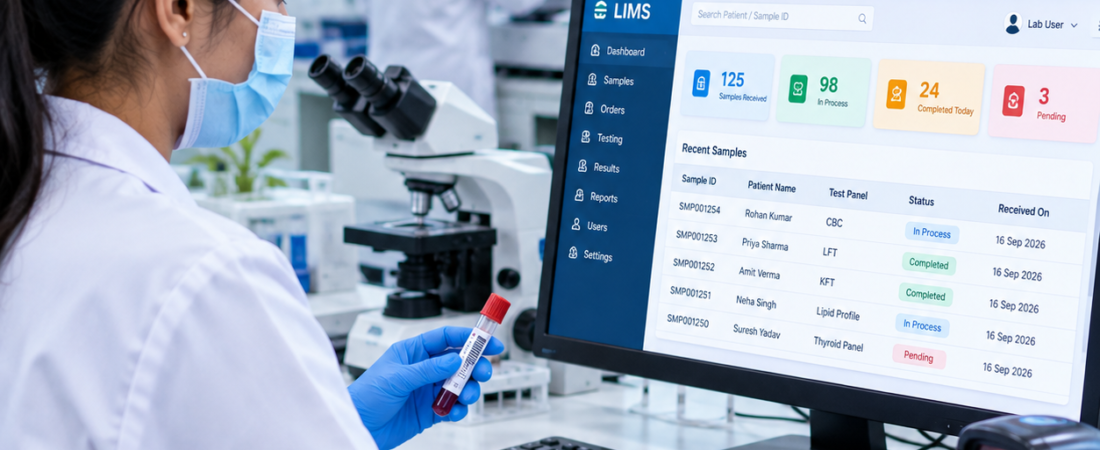
Barcoding System for Pathology Lab: Complete Sample Tracking Guide
Quick answer: A barcoding system for pathology lab operations connects each specimen with the correct patient, order and test, then helps staff identify and track that specimen through collection, accessioning, testing and reporting. The most useful system is not simply a barcode printer; it is barcode tracking built into the laboratory workflow.
If you run a pathology lab, diagnostic centre or hospital laboratory, this guide explains what to check before choosing a barcode-enabled LIMS and how to test the workflow with your own sample types.
The barcode is only the visible part. The real value comes from the workflow behind it.
What does a barcoding system actually do in a pathology lab?
Short answer: It gives a specimen a machine-readable identity that staff can scan to retrieve the correct sample record and follow its progress through the laboratory workflow.
A pathology barcode system gives a specimen a machine-readable identity that can be scanned during laboratory processes.
In a properly connected workflow, the relationship looks something like:
Patient → Order → Sample → Barcode → Test → Result → Report
The exact implementation depends on the laboratory’s software, specimen types and operating procedures. Indian pathology software providers already use barcode-supported workflows for sample collection, accessioning and testing. ADILAB, for example, describes generating a barcode during sample collection, attaching it to the vial and scanning it when the specimen reaches the laboratory.
That is the basic idea.
But a barcode should not become another disconnected step in the lab.
It should be part of the laboratory management workflow.
Why is barcode printing alone not enough?
Short answer: Printing a label is only the first step. The software must also connect the barcode to the right record and show what happens to the specimen after each scan.
This is where many software demonstrations become misleading.
A vendor prints a sample label, scans it and says the lab now has barcode tracking.
That proves the scanner works.
It does not prove that the laboratory has a reliable tracking system.
Ask what happens after the scan.
Does the software open the correct patient order? Does it show the required test? Does it update the sample status? Can the laboratory see where the sample is in the workflow?
EzeeLab describes barcode tracking as part of a wider LIMS workflow covering registration, sample collection, processing, analyzer integration, verification and report delivery.
That is the model worth testing.
What should happen when a sample is collected?
The barcode workflow should start as close to sample collection as your laboratory’s process requires.
After the patient and test order are registered, the software can generate or associate a sample identifier and print the appropriate label.
The label is then attached to the specimen container according to the laboratory’s procedure.
The important part is the digital association behind that label.
When the barcode is scanned later, the system should identify the relevant sample record rather than forcing staff to manually search through patient records.
For a pathology laboratory, test this with different specimen types during a software demo rather than using only one easy example.
Practical example: Imagine a patient has CBC and thyroid tests collected in two different tubes. During the demo, scan both labels and check whether the system keeps the specimens separate while still connecting them to the same patient and order.
Should the barcode identify the patient or the specimen?
This question deserves more attention than it gets.
A laboratory workflow has patient identity, orders, specimens and tests. Your software should clearly define what the barcode represents and how that identifier connects to the rest of the record.
Some laboratory systems describe barcode-based identification that connects samples with patients, tests and laboratory records.
The implementation should be documented in the laboratory’s procedures.
Don’t let staff create their own barcode conventions from one department to another.
Consistency matters because the scanner is only as useful as the record it retrieves.
Where should barcode scanning happen?
Don’t put a scanner at the front desk and call the workflow complete.
Look at the entire sample journey.
A pathology laboratory might have scanning points around:
- Sample collection
- Sample receipt or accessioning
- Department processing
- Testing
- Sample transfer
- Storage or retention
- Final workflow or reporting
The exact points should follow the laboratory’s actual SOPs.
The useful question is:
“At which points do we need to prove that this is the same specimen we think it is?”
Those are the places where barcode scanning has operational value.
What happens when a barcode does not scan?
Short answer: A failed scan should trigger a controlled recovery process, not a new sample record created by guesswork. The system should help authorised staff identify the existing specimen safely.
This is one of the first failure scenarios I would test with a vendor.
A barcode may be damaged, poorly printed, incorrectly positioned or unreadable by the available scanner.
What happens next?
The software should have a controlled fallback process that lets authorised staff identify the sample without quietly creating a second record.
That last part matters.
If staff simply type a new ID every time a barcode fails, the laboratory can end up with duplicate or inconsistent records.
Ask the vendor to demonstrate:
“The barcode cannot be scanned. Show me exactly what the technician does.”
If the answer is “just search for the patient,” ask what prevents the wrong sample from being selected.
How should a barcode system handle multiple samples from one patient?
A patient may have more than one specimen associated with an order or visit.
The barcode workflow therefore needs to distinguish the relevant specimen records rather than treating the patient’s identity as the specimen identity.
This becomes especially important when different departments process different specimen types.
The software should make the relationship between patient, order, specimen and test clear to the user.
PrimeDoc, for example, describes barcode label printing, sample ID generation, real-time status tracking and support for multiple sample types as part of its laboratory workflow.
During a demo, don’t test only one sample.
Test a patient with multiple specimen types and see what appears after each scan.
Can barcode tracking follow a sample between departments?
It should be designed for the real movement of specimens inside your laboratory.
A sample may move from collection to accessioning and then to another department for testing.
The barcode gives staff a consistent identifier while the software records the corresponding workflow status.
EzeeLab describes barcode tracking across sample collection, accessioning, testing and quality-control workflows, while LabFlow describes barcode and sample tracking across collection, accessioning and department-specific workflows.
For a multi-department laboratory, ask one practical question:
“If this sample leaves my department right now, where does the next person see it?”
That answer tells you more than a feature list.
What about analyzer integration?
Barcode identification becomes more useful when the laboratory’s software and analyzers work together correctly.
Some LIMS platforms support analyzer integration so results can be transferred into the laboratory software rather than being manually entered. EzeeLab describes analyzer integration alongside barcode sample tracking as part of its LIMS workflow.
But don’t assume every analyzer, interface or barcode format will work with every LIMS.
Give the vendor your actual analyzer models and ask them to demonstrate the interface you need.
Practical check: If your lab already uses an analyzer, give the vendor the exact analyzer model and interface requirement. Ask them to demonstrate the complete path from barcode scan to result transfer instead of relying on a generic “analyzer integration available” statement.
What barcode type should a pathology lab use?
There is no single barcode format that should automatically be used for every laboratory application.
The choice depends on what data needs to be encoded, label size, scanner capability, workflow requirements and the relevant standards or procedures.
GS1 explains that different barcode data carriers and application identifiers serve different healthcare use cases. Its healthcare guidance specifically discusses GS1 DataMatrix and other barcode technologies for identification and traceability.
One important distinction: GS1’s guidance about DataMatrix and QR Code on healthcare products is primarily about healthcare product identification, not automatically about pathology specimen labels. Don’t copy a pharmaceutical barcode standard into a pathology specimen workflow without checking whether it applies.
For a pathology laboratory, choose the barcode format with your software vendor, label/printer supplier and laboratory quality team based on the actual workflow.
How does barcode tracking relate to ISO 15189 and NABL?
Short answer: Barcode tracking can support specimen identification and traceability, but barcode software by itself does not make a laboratory ISO 15189 or NABL compliant. Compliance depends on the laboratory’s complete quality system, procedures, records and applicable requirements.
Barcode software should not be sold as a shortcut to accreditation.
ISO 15189:2022 specifies requirements for quality and competence in medical laboratories. NABL identifies ISO 15189 as the accreditation standard for medical laboratories in India.
For anatomic pathology, ISO has also published ISO/TS 23824:2024, which provides guidance on applying ISO 15189 in anatomic pathology laboratories.
A barcode system may support traceability and identification workflows, but whether your laboratory meets accreditation requirements depends on the complete management system, procedures, records and applicable criteria.
NABL publishes specific criteria and guidance documents for medical laboratories, including NABL 112A and NABL 112B.
laboratory management system for diagnostic centres
What should you check before buying a pathology barcode system?
Short answer: Test the barcode system against your real patient, specimen, printer, scanner and analyzer workflow. A checklist is more useful than judging the product from a feature list.
- Barcode generation and unique sample identification
- Actual label size, printer and specimen compatibility
- Fast and accurate scanning at each required workflow point
- Clear patient, order, specimen and test information after scanning
- Sample status and movement history
- Handling of multiple specimens for one patient
- Controlled recovery when a barcode cannot be scanned
- Department transfers and audit trail
- Analyzer/interface compatibility
- Staff roles and access controls
Forget the sales presentation for a moment.
Give the vendor a real sample workflow.
1. Barcode generation
Ask how the barcode is generated and how it is associated with the sample record.
2. Label printing
Test your actual label size, printer and specimen containers.
3. Scanning
Test the scanners your staff will actually use at collection and laboratory workstations.
4. Sample identification
Scan the sample and verify exactly which patient, order and test information appears.
5. Sample status
Check whether scanning updates or displays the appropriate workflow status.
6. Multiple specimens
Test one patient with different sample types instead of demonstrating only one tube.
7. Failed barcode
Ask the vendor to demonstrate the fallback process for an unreadable label.
8. Transfers
Move a sample between departments and check whether its history remains clear.
9. Analyzer integration
If you use analyzers connected to your LIMS, test the actual interface rather than accepting a generic “integration available” statement.
What are the benefits—and what doesn’t barcode software solve?
A well-designed barcode workflow can reduce the amount of manual identification and make sample tracking easier. It can also give staff a consistent way to retrieve sample information during processing.
Indian pathology software providers commonly position barcode tracking around sample identification, traceability and workflow automation.
But barcodes do not fix every laboratory process.
A badly designed accessioning workflow remains badly designed after a barcode is added.
A wrong patient selection can still be a workflow problem. A poorly maintained database can still contain incorrect information. A damaged label can still require a controlled recovery procedure.
The barcode is a tool.
The laboratory workflow is what makes that tool useful.
Where does PathXprt fit into a pathology barcode workflow?
Key takeaway: For a pathology or diagnostic laboratory, barcode tracking works best when it is part of the wider LIMS workflow rather than a standalone label-printing feature.
PathXprt is positioned as laboratory management software for pathology and diagnostic workflows.
If your requirement is bigger than simply printing barcode labels, evaluate the barcode process together with patient registration, sample management, testing and reporting.
Explore PathXprt and evaluate whether its laboratory workflow matches the way your team actually handles specimens.
LIMS software for small pathology labs
What is the best way to test a barcoding system before buying it?
Short answer: Run a live test using your own sample types and deliberately include a failure case. This shows whether the barcode system works in day-to-day laboratory conditions, not just in a sales demonstration.
Five-minute demo checklist
- Register one test patient and create multiple specimens.
- Print the labels using the printer your lab plans to use.
- Scan each specimen at collection and accessioning.
- Move one specimen to another department and check its status.
- Make one barcode unreadable and ask the vendor to demonstrate the approved recovery process.
Don’t ask for another slideshow.
Ask for a live workflow.
Give the vendor one patient and multiple specimens. Generate the labels. Scan them at collection. Receive them in the laboratory. Move one specimen to another department. Process the sample. Then deliberately introduce a problem: an unreadable barcode or a specimen that needs manual identification.
Watch what happens.
A good barcoding system for pathology lab operations should make the correct sample easy to identify and the sample’s workflow easy to understand.
Next step: write down your actual specimen journey from collection to report and ask every software vendor to demonstrate that exact journey using your sample types, printer and scanner.
Barcoding System for Pathology Lab: FAQs
What is a barcoding system in a pathology lab?
A barcode system assigns a machine-readable identity to a specimen so staff can quickly retrieve the correct sample record and track it through the laboratory workflow.
Does barcode software replace a LIMS?
No. Barcode tracking is normally one part of a wider LIMS or laboratory management workflow covering registration, samples, testing and reporting.
Can one patient have multiple barcodes?
Yes. A patient can have multiple specimens or orders, and the software should keep each specimen distinct while maintaining its connection to the correct patient and order.
What should happen if a barcode is unreadable?
The laboratory should have a controlled fallback process for authorised staff to identify the existing specimen without creating a duplicate record.
Does using barcodes make a lab NABL compliant?
No. Barcode software may support traceability, but accreditation depends on the laboratory’s complete quality management system and applicable NABL and ISO requirements.