
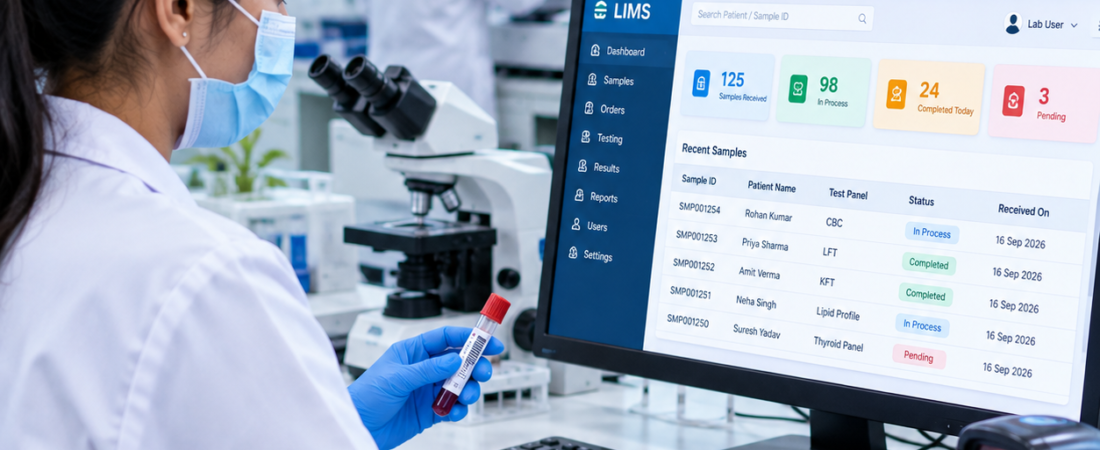
Best Laboratory Management System for Small Labs
Who is this guide for? This guide is for small pathology labs, diagnostic centres, clinic laboratories and laboratory owners who are evaluating software to replace paper records, spreadsheets or disconnected tools. It is especially useful when a growing workload makes sample tracking, reporting or billing harder to manage manually.
Best laboratory management system for small labs can make everyday laboratory work more organized, simple, and efficient. Small diagnostic laboratories often work with limited staff while managing patient registration, sample collection, testing, reporting, billing, and records at the same time.
As a laboratory grows, handling these activities manually can become difficult. Staff may spend more time searching for patient records, tracking samples, preparing reports, and maintaining billing information instead of focusing on laboratory operations.
The right laboratory software can bring these activities together in one structured workflow. For a small lab, the goal is not to have complicated software. The goal is to have practical tools that make daily work easier.
Table of Contents
- Why Small Labs Need Laboratory Management Software
- What Makes the Best Laboratory Management System for Small Labs?
- Patient Registration and Management
- Sample Tracking and Barcode Management
- Test and Result Management
- Digital Laboratory Reports
- Billing and Payment Management
- 7 Important Benefits for Small Labs
- Data Security and User Access
- How to Choose the Right System
- PathXprt for Small Laboratories
- Frequently Asked Questions
- Conclusion
Why Small Labs Need Laboratory Management Software
Small diagnostic laboratories may have fewer employees than large diagnostic chains, but their daily workflow can still involve many different tasks. A receptionist may register patients and manage billing, while technicians collect and process samples and authorized professionals review results.
When these activities are handled through paper files, spreadsheets, or separate applications, information can become difficult to track. Even a moderate increase in patient volume can create additional administrative work.
A laboratory management system can connect patient registration, sample collection, testing, reporting, and billing in a single digital workflow. This can help staff find information faster and reduce repetitive manual work.
Laboratory quality also depends on organized processes. The WHO Laboratory Quality Manual provides useful information about laboratory quality management and organized laboratory practices.
What Makes the Best Laboratory Management System for Small Labs?
Short answer: Look for a system that covers the core workflow your team actually uses—patient registration, sample collection, barcode tracking, testing, result verification, reporting and billing—without adding unnecessary complexity.
The best laboratory management system for small labs should be easy to understand, practical for daily use, and capable of supporting the laboratory as it grows.
Small laboratories should focus on features that solve real operational problems rather than choosing software simply because it has a large number of features.
A useful system should ideally support:
- Simple patient registration
- Patient history management
- Sample collection
- Barcode-based sample identification
- Test and package management
- Result entry
- Result verification
- Report generation
- Billing and payment management
- User roles and permissions
- Data backup
- Operational reports and dashboards
- Future scalability
Patient Registration and Management
Short answer: A good patient module should let staff register new patients quickly, find returning patients, view previous records and keep referral details organized.
Patient registration is normally the starting point of a diagnostic laboratory workflow. A digital patient management system can help staff record important patient information and retrieve it when required.
For returning patients, staff can search existing records instead of entering all information again. This can make registration faster and keep patient information more organized.
Useful Patient Management Features
- New patient registration
- Unique patient ID
- Patient contact details
- Visit history
- Previous test records
- Referring doctor information
- Patient search
For a small laboratory, a clean patient registration screen can make a significant difference to the everyday workflow.
Sample Tracking and Barcode Management
Short answer: Sample tracking software should show the sample identity, current status and movement from collection through processing, testing and reporting.
Sample tracking is one of the most important parts of diagnostic laboratory operations. A sample may move through collection, processing, testing, verification, and reporting.
Without a structured identification system, staff may spend additional time checking the status or location of samples.
Barcode-based sample management can provide a unique identifier for each sample and help staff follow the sample through different stages.
Typical Sample Workflow:
Patient Registration → Test Selection → Sample Collection → Barcode → Processing → Testing → Verification → Report
This structured workflow can make it easier for staff to identify where a sample is and what stage of processing it has reached.
Test and Result Management
Small laboratories may perform routine pathology tests, profiles, packages, and specialized investigations. Managing test information digitally can make the process more organized.
Test Management
Laboratory software can store test names, departments, sample types, parameters, prices, reference ranges, and other configuration information.
Result Entry
Authorized laboratory users can enter test results against the appropriate patient and sample record. Depending on the workflow, results can then be reviewed and verified before the report is released.
Result Verification
A controlled verification process can help ensure that reports follow the laboratory’s defined workflow before they are delivered to patients or healthcare professionals.
Digital Laboratory Reports
Short answer: Laboratory software can simplify report preparation by connecting verified results with patient details and predefined report templates.
Diagnostic reports are an important part of the patient experience. A laboratory management system can help generate reports using predefined templates and organized result information.
Digital report management can support:
- Result verification
- Report templates
- Patient information
- Laboratory branding
- Doctor information
- Report printing
- Digital report delivery
The exact reporting workflow should be configured according to the laboratory’s professional processes and applicable requirements.
Billing and Payment Management
Short answer: Integrated billing can connect selected tests or packages with invoices, payments, receipts and outstanding amounts, reducing the need to maintain separate records.
Billing is another area where small laboratories can benefit from an integrated software system. When tests and packages are connected with billing, staff can manage invoices and payments within the same workflow.
Common Billing Functions
- Test billing
- Package billing
- Discount management
- Payment recording
- Receipt generation
- Pending payment tracking
- Daily collection reports
Keeping billing information organized can help laboratory owners understand daily transactions without relying heavily on separate spreadsheets or paper records.
7 Important Benefits of the Best Laboratory Management System for Small Labs
1. Saves Administrative Time
Routine activities such as registration, billing, sample identification, and report preparation can be organized through one connected workflow.
2. Keeps Records Organized
Patient, test, sample, report, and billing information can be maintained in a structured digital environment, making information easier to search.
3. Improves Sample Visibility
Barcode-based workflows can help staff identify samples and monitor their status during different stages of laboratory processing.
4. Supports Consistent Reporting
Predefined report templates can help laboratories maintain a consistent format while organizing patient and result information.
5. Simplifies Billing
Connecting laboratory tests with billing can make invoice creation, payment recording, and daily collection management easier.
6. Supports Future Growth
A small laboratory may expand its patient volume, test menu, staff, or collection points over time. Scalable software can help accommodate these changing requirements.
7. Provides Better Operational Visibility
Dashboards and operational reports can give laboratory owners and authorized managers a clearer view of daily activities and laboratory performance.
Data Security and User Access
Laboratory systems handle patient and diagnostic information, so security should be considered when selecting software.
Small laboratories should review how the system manages user accounts, permissions, backups, access control, and data protection.
Different users may require different levels of access. For example, reception staff may need patient registration and billing access, while laboratory professionals may require access to testing and result verification functions.
The CDC laboratory quality resources provide additional information related to laboratory quality practices.
How to Choose the Right Laboratory Management System
Short answer: Start with your current workflow, then compare software against your actual needs for patients, samples, tests, reports, billing, users, integrations and future growth. A feature-heavy system is not automatically the right fit for a small laboratory.
Before selecting software, a small laboratory should first understand its current workflow and identify areas where manual work is creating delays.
For related planning, see our guides on laboratory sample tracking systems and LIMS software for small pathology labs.
Check Ease of Use
Staff should be able to learn the system without unnecessary complexity. Simple navigation can help improve adoption among users.
Check Sample Workflow
Make sure the system supports the laboratory’s sample collection, identification, processing, testing, and reporting workflow.
Check Report Customization
Review whether report templates can be configured according to the laboratory’s requirements and branding.
Check User Roles
Different staff members may need different permissions. Check whether the software supports appropriate role-based access.
Consider Future Requirements
Even if the laboratory currently has one location, future requirements may include additional users, collection centers, tests, branches, integrations, or patient-facing services.
PathXprt for Small Laboratories
PathXprt is a laboratory-focused digital solution designed to help laboratories organize their operational workflow. Depending on the selected setup, laboratories can manage areas such as patient information, sample workflows, tests, results, reports, and other laboratory activities.
For small diagnostic laboratories, the focus should be on creating a straightforward digital workflow that staff can use consistently as the laboratory grows.
Ready to Simplify Your Small Lab Operations?
Explore PathXprt and discover how a modern laboratory management platform can help organize your diagnostic workflow.
Frequently Asked Questions
What is the best laboratory management system for small labs?
The right system depends on the laboratory’s workflow, patient volume, tests, reporting requirements, staff, budget, and future growth plans. A suitable system should provide essential laboratory features without making everyday operations unnecessarily complicated.
Do small laboratories need laboratory management software?
Small laboratories can benefit from software when patient registration, sample tracking, reporting, billing, and record management become difficult to manage manually.
Can small labs use barcode sample tracking?
Yes. Barcode-based identification can help small laboratories identify samples and monitor them through collection, processing, testing, and reporting stages.
Can laboratory software manage billing?
Many laboratory management platforms provide billing features for tests, packages, discounts, payments, receipts, and outstanding amounts. Available functionality varies by software.
Can laboratory software generate diagnostic reports?
Yes. Laboratory software can support result entry, verification, report formatting, report generation, and report delivery according to the configured workflow.
Is cloud-based laboratory software suitable for small labs?
Cloud-based software can be suitable when it provides appropriate security, access control, backup, support, and reliable connectivity. The preferred deployment model depends on the laboratory’s requirements.
Can a small lab expand the software later?
Many modern laboratory platforms support growth. Before selecting a system, check whether additional users, tests, branches, collection centers, and integrations can be added when required.
Conclusion
The best laboratory management system for small labs should make daily laboratory work simpler, more organized, and easier to monitor. Patient registration, sample tracking, test management, result verification, reporting, and billing are some of the core areas where laboratory software can support small diagnostic centers.
The most important factor is not simply the number of features. The system should match the laboratory’s workflow, be easy for staff to use, provide appropriate access controls, and have enough flexibility to support future growth.
With a well-planned digital workflow, small laboratories can reduce repetitive administrative work and create a more organized experience for laboratory staff, doctors, and patients.