
Pathology Lab Management Software in Noida & Delhi NCR: A Practical Guide
Quick answer: Pathology lab management software in Noida and Delhi NCR should connect patient registration, sample collection, barcode tracking, testing, reporting, approval, billing and communication in one practical workflow. The right choice depends on your lab size, sample volume, collection model and reporting process—not simply on the number of features a vendor lists.
This guide is for pathology labs, diagnostic centres, hospital laboratories and collection centres in Noida, Greater Noida, Ghaziabad, Delhi and the wider NCR region. If you are comparing software, use the checklist below to test whether it fits the way your team actually works.
If you run a pathology lab in Noida or Delhi NCR, you need more than software that simply prints reports. Pathology lab management software should connect patient registration, sample collection, testing, reporting, approval and billing in one workflow.
For laboratories looking for that kind of setup, PathXprt is one option worth evaluating, particularly if you want cloud-based laboratory software with sample tracking, custom reporting, analyzer interfacing, finance and multi-location support.
Why does a pathology lab in Noida need dedicated lab software?
Short answer: A dedicated system keeps patient, sample, testing, reporting and billing information connected, so staff do not have to maintain the same information in separate registers or applications.
Because the daily workflow is not just “enter patient → print report.”
A typical laboratory operation involves several connected steps. Patient details are recorded, tests are ordered, samples are collected, specimens are identified and processed, results are entered or received from equipment, reports are checked and approved, and the final report reaches the patient or referring doctor.
If those steps are handled through separate registers, spreadsheets, messaging apps and billing software, staff have to move information from one place to another.
That is exactly where laboratory management software earns its place.
The right system gives the lab a single workflow instead of making employees maintain several disconnected records.
What should you check before buying pathology software in Delhi NCR?
Short answer: Check the complete patient-to-report workflow first: registration, sample identification, testing, approval, report delivery and billing. Then check integrations, permissions, support and scalability.
Don’t start with the software’s longest feature list.
Start with your own lab.
If you are operating a standalone pathology laboratory in Noida, Greater Noida, Ghaziabad, Delhi or another NCR location, ask the vendor to demonstrate the workflow you actually use.
Can the receptionist register a patient quickly?
Can the sample be identified and tracked?
Can the technician enter results without searching through multiple screens?
Can the doctor approve the report?
Can the patient receive the final report digitally?
And what happens to billing?
Those questions are more useful than asking whether the software has “advanced technology.”
Patient registration and order management should happen in one place
The front desk is where most laboratory workflows begin.
PathXprt’s published order-management features cover patient registration, sample collection, appointment management, customizable forms, SMS/email/WhatsApp communication and online payments.
That gives a lab a single starting point for the patient’s order.
It also means you can configure the workflow around your own laboratory instead of expecting staff to change everything about the way they work.
For a small or mid-sized lab, that matters.
A complicated system can have impressive functionality and still become a daily frustration if reception staff need too many steps for routine work.
Pathology Lab Patient Management
Sample tracking is where software needs to prove itself
Short answer: A good sample-tracking workflow should let staff identify a specimen, see its current status and follow its movement from collection through testing and reporting.
Ask a software vendor to demonstrate one sample from registration to reporting.
Not a slideshow.
A real workflow.
PathXprt’s accessioning features include barcode printing and tagging, sample tracking, sample segmentation, outsourcing workflows, sample acceptance/rejection, archiving and direct barcode scanning.
The value here is traceability.
A laboratory should be able to identify where a sample came from and follow its movement through the testing process.
This becomes even more relevant when a lab has collection centres or multiple locations.
PathXprt also publishes multi-location support for centralized management of branches and partner laboratories.
[INTERNAL LINK: Sample Tracking Software]
Reporting is not just about making a PDF
Short answer: Reporting should cover result entry, verification, approval, customizable formats and secure delivery—not just generating a PDF.
A pathology report is the output your patient and referring doctor actually see.
So report software needs to be flexible enough for the laboratory’s requirements.
PathXprt lists digital report generation, custom templates, speech-to-text entry, bulk reporting and an error-checking engine among its reporting features.
Custom templates are particularly useful when different tests require different reporting formats.
But there is another part of the workflow that should not be skipped: approval.
PathXprt’s published approval module includes physician verification, secure logins and an approval workflow before reports are dispatched.
When you take a demo, ask the vendor to show the complete sequence:
result entry → verification → approval → report dispatch.
That is much more useful than seeing a polished sample report.
What about analyzer or machine integration?
Short answer: Confirm integration using the exact analyzer models your lab operates. Ask how results move into the LIMS, how errors are handled and where verification happens before approval.
This is a question you should ask before purchasing, not after implementation.
PathXprt lists laboratory equipment interfacing and direct analyzer integration as part of its platform.
But don’t accept “analyzer integration available” as the end of the conversation.
Give the vendor the exact analyzer models used by your laboratory and ask whether those machines are supported.
Then ask how results move between the analyzer and the software, how errors are handled, and whether the result is reviewed before final approval.
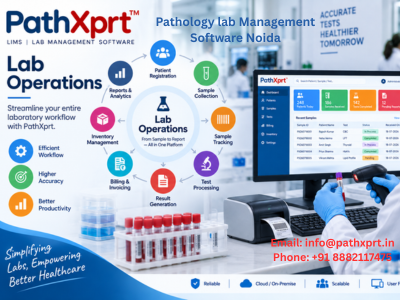
This makes the buying conversation concrete.
Billing should follow the laboratory workflow
Short answer: Billing works better when patient orders, tests, rate lists, discounts, payments and invoices stay connected to the laboratory workflow.
Billing becomes messy when the billing system and laboratory system maintain separate information.
PathXprt includes finance functionality covering online and offline payments, dues collection, invoices, rate lists, discounts and MIS reports/analytics.
For a laboratory, this means financial information can sit alongside the operational workflow instead of being maintained completely separately.
If you offer different rates to different clients, ask the vendor to demonstrate how those rate lists work.
If you give discounts, test that too.
A demo should use your real billing rules, not an artificial example.
Pathology Lab Billing Software
Is cloud-based pathology software useful for NCR labs?
Short answer: Cloud access can be useful when a laboratory has multiple users, collection centres or branches, but the buying decision should also consider permissions, backups, data access and support.
PathXprt describes itself as a cloud-based solution for diagnostic labs, hospital labs, clinics and individual laboratories.
For a laboratory with users working across different locations, cloud access can make centralized access and management easier.
This becomes more relevant when a business has a main laboratory plus collection centres or additional branches.
Still, don’t choose cloud software simply because “cloud” sounds modern.
Ask practical questions:
Who can access the system?
How are user permissions controlled?
How is data backed up?
What happens if an employee leaves?
How is old data exported if the laboratory changes systems later?
Those answers deserve more attention than the word “cloud.”
What makes PathXprt relevant to a Noida laboratory?
Short answer: PathXprt is a Noida-based laboratory software option, so local labs can evaluate its workflow through a practical demo and discuss their specific implementation needs.
There is a straightforward local reason to evaluate it.
PathXprt is operated by Hukamsar Technologies Pvt Ltd, whose published address is 107, H-Block, Sector 63, Noida, Uttar Pradesh 201301.
That doesn’t automatically make the software right for every laboratory.
It does make a local demo and implementation discussion particularly relevant for a buyer in Noida.
PathXprt’s published product workflow covers order management, sample collection, accessioning, pathology, reporting, approval, dispatch and finance. It also lists custom reporting, analyzer interfacing, multi-location support and dashboard/analytics capabilities.
For a Delhi NCR laboratory, those are the areas I would test first.
Noida, Delhi or Greater Noida: what should you ask during the demo?
Short answer: Ask the vendor to run one realistic patient-to-report case using your sample types, report format, billing rules and analyzer requirements.
Don’t spend the entire demo watching the salesperson click through menus.
Give them a scenario.
For example:
A new patient arrives at the reception desk.
They need a CBC and another test. Register the patient. Generate the order. Create the sample identification. Move it through the laboratory workflow. Enter the results. Send it for approval. Generate the report. Record payment. Finally, show how the report is delivered.
Then ask the vendor to repeat the same process for a second patient.
You’ll quickly see whether the system is built around an actual laboratory workflow or simply a collection of individual modules.
For a Delhi NCR lab, I would also ask about:
- Support and onboarding
- Data migration from existing software
- Analyzer integration
- User permissions
- Report customization
- Backup and data security
- Collection-centre workflows
- Multi-location management
- Billing and rate-list configuration
- WhatsApp/SMS/email communication
Who should consider PathXprt — and who shouldn’t?
Short answer: It is worth evaluating if you need an integrated workflow for patient orders, samples, testing, reporting and finance. If you only need a basic report-printing tool, a full laboratory platform may be more than you need.
PathXprt is designed for diagnostic labs, hospital labs, clinics and individual laboratories, according to its published product information.
It is worth considering if your laboratory wants an integrated system covering the operational journey from order management through reporting and finance.
It is less useful to buy a full laboratory platform if your requirement is only a very basic report-printing tool and you have no need for structured sample tracking, workflow management, integration or expansion.
There is no prize for buying the software with the largest feature list.
Buy the system that your staff will actually use.
A practical way to compare pathology lab software in Noida
Short answer: Compare vendors using the same five real lab situations so you can judge workflow, ease of use and exception handling rather than comparing feature lists.
Create a small checklist before booking demos.
| Workflow | What to test |
|---|---|
| Registration | Patient details, test order and repeat visit |
| Sample | Barcode, collection, tracking and rejection |
| Testing | Result entry and analyzer integration |
| Reporting | Verification, approval and delivery |
| Billing | Rate list, discount, payment and invoice |
Take five real situations from your laboratory.
One routine patient.
One repeat patient.
One sample that needs rejection or correction.
One report requiring approval.
One billing case involving your normal pricing or discount.
Ask every vendor to demonstrate the same situations.
Then compare what you actually experienced.
This is a better comparison method than reading ten pages of feature lists because every vendor gets the same test.
[INTERNAL LINK: LIMS Software Comparison]
What should you do before making the final decision?
Short answer: Run a live demo with your own workflow and confirm the system handles the routine cases as well as exceptions before you commit.
Start with a live demo.
PathXprt provides a product workflow covering registration and orders, sample collection, accessioning, pathology, reporting, approval, dispatch and finance.
Ask the team to demonstrate your actual laboratory workflow rather than a generic presentation.
If you are based in Noida, Delhi, Greater Noida, Ghaziabad or another Delhi NCR location, use your own test names, report formats, billing rules and analyzer requirements during the discussion.
That will give you a much clearer answer about whether the system fits your lab.
Pathology Lab Management Software FAQs
What is pathology lab management software?
It is software that connects patient registration, sample collection, testing, reporting, billing and related laboratory workflows in one system.
Which labs can use pathology lab management software?
Pathology labs, diagnostic centres, hospital laboratories and collection-centre networks can use it when they need structured sample and reporting workflows.
What should I check in a pathology software demo?
Ask the vendor to demonstrate one complete patient-to-report journey, including barcode tracking, result entry, approval, report delivery and billing.
Does the software need analyzer integration?
If your laboratory uses analyzers, confirm support for the exact models you operate and ask how results are transferred and reviewed.
Is cloud-based lab software suitable for multiple branches?
It can be useful for centralized access, but evaluate user permissions, backups, support and data access before choosing a cloud platform.
For a Delhi NCR pathology lab, the next practical step is to request a PathXprt demo and test one complete patient-to-report workflow before you commit to the software.