
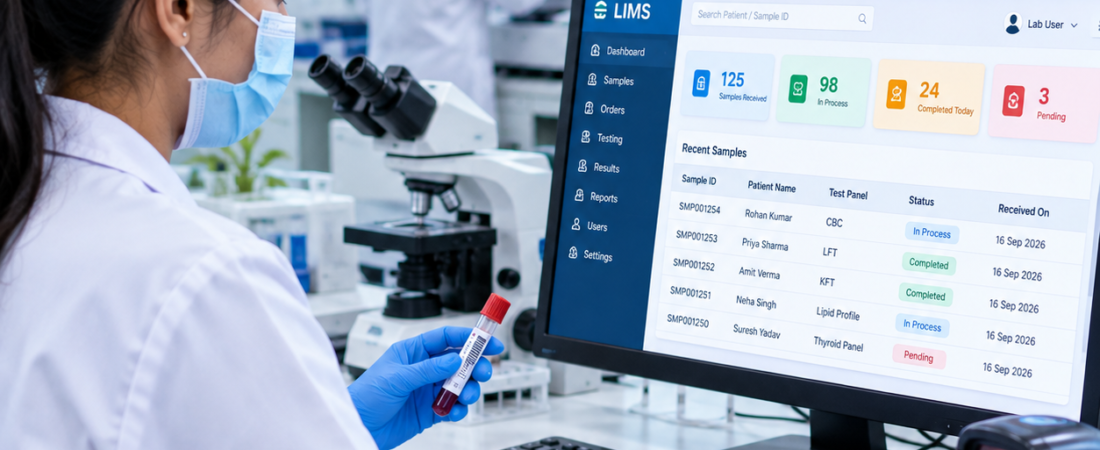
How to Choose the Best LIMS Software in Delhi, India
If you are searching for the best LIMS software in Delhi India, the most useful starting point is not a vendor ranking. It is your laboratory workflow. A suitable LIMS should connect patient registration, test ordering, sample collection, accessioning, barcode identification, testing, result verification, reporting and the operational processes around them.
Bottom line: The best LIMS for a Delhi laboratory is the system that fits the laboratory’s real workflow, supports its instruments and users, keeps patient and sample information connected, provides appropriate access controls and audit history, and can scale as the laboratory adds tests, users, collection centres or branches. A live demonstration using your own sample-to-report process is more useful than comparing feature counts.
Who this guide is for: Pathology lab owners, diagnostic-centre owners, pathologists, laboratory managers, operations teams, IT managers, hospitals, collection-centre networks and diagnostic chains in Delhi, New Delhi and Delhi NCR.
What Is LIMS Software?
Short answer: LIMS (Laboratory Information Management System) is software that helps a laboratory manage information and workflows around patients, samples, tests, results, reports and laboratory operations.
In a pathology or diagnostic laboratory, the useful question is not whether a product has a long feature list. The question is whether the system keeps the right information connected as a sample moves through the laboratory.
A typical workflow can include:
- Patient registration and test ordering
- Sample collection and identification
- Barcode generation and scanning
- Sample accessioning, acceptance and rejection
- Sample movement and status tracking
- Test processing and analyzer interfacing where applicable
- Result entry, verification and approval
- Report generation and digital delivery
- Billing, payments and discounts
- Inventory and operational reporting
- User permissions and audit history
The World Health Organization’s laboratory quality management guidance treats information management as an important part of laboratory quality and highlights considerations such as unique patient and sample identifiers, data protection, reporting, communication and information security. WHO Laboratory Quality Management System Handbook.
Why Do Delhi Laboratories Need the Right LIMS?
Short answer: A LIMS becomes valuable when manual registers, spreadsheets, repeated data entry or disconnected systems make it difficult to trace patients, samples, results and reports.
Delhi and the wider NCR region include independent pathology laboratories, diagnostic centres, hospital laboratories, collection-centre networks and growing multi-location operations. Their workflows are not identical, so the right software should be selected around the actual laboratory rather than around a generic city-specific feature list.
For example, a standalone pathology lab may care most about fast registration, barcode tracking, reporting and billing. A diagnostic chain may need centralized governance, branch-level permissions, sample routing, consolidated MIS and location-wise inventory. A hospital laboratory may put more emphasis on integration with other clinical systems.
That is why “best” should mean best fit for the laboratory, not “the software with the most features.”
How to Choose the Best LIMS Software in Delhi
1. Patient Registration and Test Ordering
What to check: The front desk should be able to register a patient, select tests, create an order and capture the required information without unnecessary duplicate entry.
During a demo, test three scenarios: a new patient, a returning patient and an order containing multiple tests. Ask how duplicate patient records are handled and whether the order remains connected to the eventual sample and report.
2. Sample Registration and Accessioning
Accessioning is where the laboratory takes control of the specimen. A practical LIMS should make the sample identity, requested tests, status and required workflow visible to authorized users.
Ask the vendor to demonstrate an accepted sample and a rejected sample. A useful system should make the difference clear instead of forcing staff to maintain a separate register for exceptions.
3. Barcode and Sample Tracking
What to check: Barcode support should do more than print a label. The barcode should help connect the physical specimen with the correct patient, order and testing workflow.
Give the vendor one sample ID and ask them to show the complete journey: collection → accession → processing → verification → report. PathXprt publishes barcode-based sample identification, accessioning and sample tracking capabilities as part of its laboratory workflow.
For a deeper checklist, see the Laboratory Sample Tracking System guide and the Barcoding System for Pathology Lab guide.
4. Analyzer and Equipment Interfacing
What to check: Verify the exact analyzer models, interface method, result-transfer process and exception handling. Do not accept a generic “analyzer integration available” statement as proof of compatibility.
Depending on the instrument and integration design, a laboratory may evaluate unidirectional or bidirectional communication, supported protocols, automatic result transfer, result matching and failure handling.
Ask:
- Which analyzer models are already supported?
- What interface or protocol is used?
- How are unmatched or failed results handled?
- Can authorized staff review imported results before approval?
- How are corrections and audit history handled?
For more detail, see Bidirectional Analyzer Interfacing with LIMS.
5. Result Entry, Verification and Pathologist Approval
Result entry and result approval should not be treated as the same action. Your evaluation should show who can enter results, who can review them, who can approve them and what happens if a result needs correction.
A useful demo sequence is:
Result entry → review → validation/approval → report generation → delivery.
Also ask how the system records amendments and important changes. The objective is not simply to generate a PDF; it is to maintain a controlled workflow around the result that reaches the patient or referring professional.
6. Laboratory Report Generation
What to check: Test your real report formats, not a sample report supplied by the vendor.
Check report templates, reference ranges, test-specific formats, branding, approval information, amendments and digital delivery. Ask the vendor to create or modify one of your actual report formats during the demo.
PathXprt’s official site describes digital report generation, customizable report templates, bulk reporting and approval workflows. These capabilities should still be matched against your laboratory’s exact reporting requirements before purchase.
7. Digital Report Delivery
Many laboratories now evaluate digital report delivery alongside report generation. Depending on the product and integrations, this can include patient portals, email, SMS, WhatsApp or downloadable reports.
Do not evaluate the communication channel in isolation. Ask how the system ensures that the approved report is connected to the correct patient and how delivery status is handled.
PathXprt publishes SMS, email and WhatsApp communication options on its official platform pages. Confirm the exact communication workflow, provider dependency and commercial terms during the demo.
8. Inventory and Reagent Management
A laboratory that depends on reagents and kits should evaluate inventory as part of the LIMS discussion.
Useful areas to test include:
- Reagent and consumable stock
- Lot and batch information where required
- Expiry monitoring
- Consumption records
- Purchase and stock records
- Minimum-stock alerts where supported
Keep sample inventory and reagent inventory conceptually separate. A patient specimen has a clinical and testing context, while a reagent has supplier, lot, expiry and consumption requirements. The software should support the workflow your laboratory actually follows.
See the Laboratory Sample Inventory Management System guide for a deeper discussion of sample inventory and traceability.
9. TAT Monitoring
What to check: The software should help you see where samples are waiting and how long different stages take.
Useful TAT views can include:
- Collection to accession
- Accession to processing
- Processing to result entry
- Validation time
- Report release
- Pending-test monitoring
Remember that software can monitor and report TAT. It cannot independently guarantee that a laboratory will meet its operational TAT.
10. Multi-Location Support for Delhi NCR Diagnostic Chains
For a laboratory with centres in Delhi, Noida, Ghaziabad, Gurugram or Faridabad, multi-location capability deserves a dedicated demonstration.
Check whether the system can support:
- Centralized management
- Branch-level user access
- Collection-centre workflows
- Sample routing between locations
- Branch-wise reporting
- Centralized or location-specific inventory
- Consolidated MIS
- Location-based permissions
Do not assume that “multi-branch” means the same thing across vendors. Ask the vendor to demonstrate a sample collected at one location and processed at another.
For a detailed buyer framework, see Multi-Location LIMS Software for Diagnostic Chains.
11. Role-Based Access and Audit Trails
Different users should not automatically have the same permissions.
Typical roles may include reception, collection-centre staff, technicians, pathologists, branch managers, administrators, finance users and management. Ask the vendor to demonstrate what each role can view, create, edit, approve or export.
Also ask what is recorded in the audit history and whether important changes can be traced back to a user and time.
12. MIS and Management Dashboards
A management dashboard should answer operational questions rather than simply display attractive charts.
Useful areas may include:
- Test volumes
- Pending samples
- TAT performance
- Branch performance
- Revenue and billing where integrated
- Inventory status
- Operational exceptions
During a demo, give the vendor a management question such as: “Which branch has the most pending samples today?” Then ask them to show how the answer is produced.
Key LIMS Features to Compare Before Buying
| Feature | Why It Matters | What to Check |
|---|---|---|
| Patient and order management | Keeps the starting record organized | Registration, test selection, duplicate handling |
| Sample tracking | Maintains specimen traceability | Status, movement and exception handling |
| Barcode | Links physical samples to digital records | Generation, scanning and workflow actions |
| Analyzer interface | Can reduce manual result entry | Exact instruments, protocols and failure handling |
| Reporting | Controls final report production | Templates, validation, amendments and delivery |
| Inventory | Helps control laboratory supplies | Stock, expiry, consumption and alerts |
| TAT | Shows workflow bottlenecks | Configurable stages and pending work |
| Multi-location | Supports growing diagnostic networks | Branch access, routing and consolidated MIS |
| Role-based access | Limits users to appropriate functions | Role and location permissions |
| Audit trail | Improves traceability of changes | User, time and change history |
| MIS | Supports operational decisions | Branch, test, TAT and financial reporting |
| API/integration | Connects LIMS with other systems | API availability, documentation and use cases |
| Backup and recovery | Supports business continuity | Backup approach, recovery process and data export |
Best LIMS Software Options for Delhi Laboratories
Search results for Delhi LIMS software include vendors such as ClinikPe, EzeeLab, ThinkLab and other laboratory-management providers. Their pages commonly emphasize patient management, billing, sample tracking, digital reports, barcode workflows and multi-location capabilities. However, vendor-published claims, pricing, ratings and implementation promises should be verified directly before making a purchase.
For that reason, this article does not present a fabricated “#1” ranking. Instead, compare each shortlisted product against the same laboratory requirements.
A useful shortlist can include:
- Workflow coverage
- Sample traceability
- Analyzer compatibility
- Reporting and validation
- Inventory
- Multi-location capability
- Security and access control
- Scalability
- API and integration options
- Implementation and support
- Total cost of ownership
Where Does PathXprt Fit?
Key takeaway: PathXprt is positioned as a LIMS platform for diagnostic and pathology laboratory workflows, so it can be included in a Delhi laboratory’s vendor evaluation. The right question is whether its published capabilities match your actual workflow and implementation requirements.
PathXprt’s official website describes workflows covering order management, sample collection, accessioning, barcode-based identification, reporting, approval, inventory, finance, dashboards and multi-location operations. It also describes laboratory equipment interfacing and digital communication options.
That makes PathXprt relevant to a buyer evaluating a broader laboratory-management platform rather than a tool designed for only one activity. Still, the final decision should be based on a live demonstration using your own patient, sample, analyzer, report, billing and branch scenarios.
See Clinical Laboratory LIMS for a workflow-focused overview, or visit the PathXprt LIMS website.
LIMS Pricing in Delhi: What Should Buyers Expect?
There is no responsible single price for LIMS software in Delhi because the scope can vary significantly between laboratories.
Pricing can be influenced by:
- Number of users
- Number of locations
- Test or accession volume
- Required modules
- Analyzer integrations
- Patient and report volume
- Cloud or on-premise deployment
- Customization
- Data migration
- Training
- API and third-party integrations
- Support and ongoing maintenance
Ask for the complete commercial picture. A low initial price can look very different after adding integrations, custom reports, migration, training and support.
Questions to Ask During a LIMS Demo
Use these questions with every vendor so your comparison remains consistent:
- Can you demonstrate a complete sample journey from registration to final report?
- Can we create and scan a barcode using our sample workflow?
- Can you show how rejected and repeat samples are handled?
- Can the system interface with our exact analyzer models?
- How are imported results reviewed before release?
- Can we customize our real laboratory report formats?
- Can branch users be restricted by location?
- Can management view consolidated MIS across locations?
- How are audit trails recorded?
- How are backups and recovery handled?
- Can we export our laboratory data?
- What happens when we add another branch?
- What API and integration options are available?
- What onboarding, training and support are included?
Common Mistakes When Buying LIMS in Delhi
- Choosing by feature count: More features do not automatically mean a better workflow.
- Skipping a live workflow demo: A polished dashboard cannot prove that the system fits your lab.
- Ignoring analyzer compatibility: Always check the exact instruments and interface requirements.
- Ignoring data migration: Ask how existing patient, test and report data will be handled.
- Ignoring report customization: Test your own report formats.
- Ignoring branch permissions: Multi-location operations need clear access rules.
- Ignoring audit trails: Important changes should be traceable according to your requirements.
- Assuming software creates NABL accreditation: LIMS can support information management and quality workflows, but software alone does not make a laboratory NABL accredited.
- Not checking data ownership and export: Understand how you can access your own data.
- Not checking recurring costs: Consider integrations, support, training and additional users or locations.
- Not testing scalability: Demonstrate what happens when sample volume, users or branches increase.
Who Should Use LIMS Software?
LIMS can be relevant for:
- Independent pathology laboratories
- Diagnostic centres
- Hospital laboratories
- Clinical laboratories
- Sample collection networks
- Multi-location diagnostic chains
- Growing laboratories adding new tests or locations
A very small laboratory with a simple, stable workflow may not need every module offered by an enterprise platform. The right software is the one that solves a real operational problem without creating unnecessary complexity.
Does LIMS Make a Laboratory NABL Compliant?
Short answer: No. LIMS software can support information management, traceability, controlled access, records and other laboratory processes, but the software itself does not grant NABL accreditation or guarantee compliance.
The laboratory remains responsible for its quality system, procedures, personnel, equipment, records and applicable requirements. WHO’s laboratory quality management guidance also treats information management as one component within the wider quality system.
For any NABL-related requirement, check the current requirements and guidance directly with NABL rather than relying on a vendor’s marketing statement.
Frequently Asked Questions
Which is the best LIMS software in Delhi?
There is no universal winner for every laboratory. The best-fit LIMS is the one that matches your sample-to-report workflow, analyzer requirements, reporting, access controls, integrations, budget and growth plans. Compare vendors using the same live workflow.
What is the cost of LIMS software in Delhi?
LIMS cost depends on users, locations, modules, test volume, integrations, deployment model, customization, migration, training and support. Ask each vendor for a complete cost based on your actual requirements rather than relying on a generic market price.
What features should a pathology lab look for in LIMS?
Start with patient and test registration, barcode sample identification, accessioning, sample tracking, analyzer integration where required, result validation, report generation, digital delivery, billing, inventory, user permissions, audit trails and operational reporting.
Can LIMS integrate with laboratory analyzers?
Many LIMS platforms support analyzer or equipment integration, but compatibility depends on the specific instrument and interface. Give vendors your exact analyzer list and ask them to explain the supported integration and exception-handling workflow.
Can LIMS manage multiple diagnostic centres?
Some platforms support multi-location operations. Ask specifically about branch-level permissions, sample routing, centralized reporting, location-wise inventory and consolidated MIS.
Does LIMS support barcode sample tracking?
Barcode workflows can connect a physical specimen with its digital patient and test record. During a demo, verify that scanning supports actual workflow actions such as accessioning, status updates or sample movement rather than only displaying a record.
Can LIMS send reports through WhatsApp?
Some products support WhatsApp report delivery through their own features or integrations. Confirm the exact workflow, approval conditions, provider dependency, message template requirements and commercial terms before implementation.
Is cloud-based LIMS suitable for Delhi laboratories?
Cloud-based LIMS can be suitable where laboratories want centralized access and multi-location workflows. Evaluate connectivity, user access, security, backup and recovery, integrations, data export and support before selecting the deployment model.
Does LIMS make a laboratory NABL compliant?
No. A LIMS can support laboratory information management and quality-related workflows, but it does not itself provide NABL accreditation or guarantee compliance.
How should I compare two LIMS vendors?
Give both vendors the same real patient-to-report workflow. Test registration, barcode identification, accessioning, analyzer integration, result validation, reporting, billing, exceptions, audit history, data export and multi-location requirements where applicable.
Final Thoughts: Choosing the Best LIMS Software in Delhi India
The best LIMS software in Delhi India is not necessarily the product with the longest feature list or the strongest marketing claim. It is the system your laboratory can use consistently while keeping the patient, sample, result and report workflow connected.
If you are evaluating LIMS for a pathology lab, diagnostic centre or hospital laboratory in Delhi NCR, start with one real sample journey. Use your own test profiles, barcode process, analyzer models, report formats, approval steps and billing rules. Then test an exception such as a rejected sample, repeat test, corrected result or transferred specimen.
That approach gives you evidence you can use to make a buying decision.
Next step: shortlist two or three LIMS products, give each vendor the same workflow, and score them on usability, sample traceability, integration, reporting, security, scalability, support and total cost.
Explore PathXprt LIMS or review the Clinical Laboratory LIMS guide before scheduling a workflow-based product discussion.